Showing posts with label thinkpad. Show all posts

Thursday, May 24, 2012

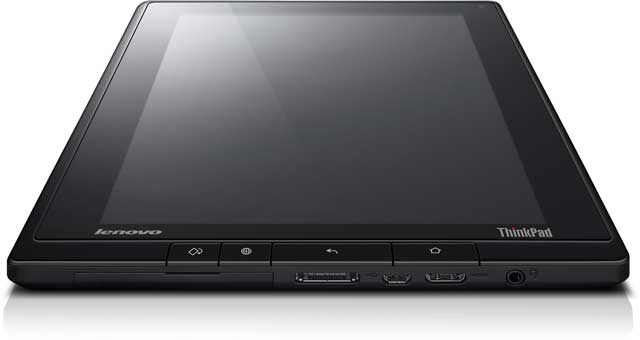
Thinkpad Tablet - The Actual Review (part 1): Physical form and construction

This series of reviews will focus on a single aspect per part.  The final part will sum up what I think.  In this first part the focus is on physical form and construction.

Positive
  • The Thinkpad Tablet seems indestructible but not chunky.  When you hold it, it feels solid but at the same time it is sleek enough not to feel like a clunky, chunky, brick.  And by all accounts, it is indestructible or, at least, designed to withstand more than any normal range of destruction.
  • It looks good.  Business, black, characteristic red spot on the digitiser (stylus) and it feels comfortable in the hand.
  • There is a USB port!  Amongst other useful connection sockets, the USB port stands out as a very useful addition.  While the world is slowly moving to less of the physical connections that come with plugging things in, that wireless world is not quite here yet.  In perhaps 5 to 10 years time, when data can be stored and transmitted in huge quantities via the Internet, there will be a sharp drop off in external hard drives and USB storage, but until then, USB is still the common format of choice for physical file transfer.
  • The mini HDMI (and other standard ports) are also great.  This is even more true for an education setting where it is helpful to be able to connect your device to projection or TV systems to share media with your class.  An HDMI to VGA adapter would be necessary in most cases (since schools have VGA cable connections to most projectors) but that is the price of being cutting edge, as the Thinkpad Tablet certainly is.  Being able to connect a standard SIM card is also a bonus (for the 3G model) as you can connect on the go, between wireless networks - great for working on the train or bus on your way to the office.
  • My colleagues to whom I showed the Thinkpad Tablet felt that no extra case is necessary which is very unlike most tablets.  If you take the iPad as en example, the first thing most people do is to buy a case to go with it!  The Thinkpad Tablet is certainly secure enough without a case, though for style or convenience a keyboard folio is a good option in my opinion.
  • I found the screen width great for viewing complete web pages.  While the tablet feels a little narrow, in the landscape position, this is something that I could get used to.  As a notebook in the portrait position, I'm not a fan.
  • Good battery life seems fine for all day use.  I didn't notice any sharp drops in the indicator which seems fairly well calibrated to the actual charge remaining.
Negative
  • The buttons on the front face seem unnecessary as they are never used, at least not by me!  I found that I only used the volume buttons and the on/off/wake/sleep button.  
  • For typical use, I don't think this device was made to be used while docked.  It is too narrow when vertical and feels a bit odd to view because of this.  An extra inch to inch and a half would go down well.  That's not really a problem though, because it is designed as a mobile device of course.
  • In landscape, the already small height is cut off even further by the menus.  This is also something that a regular user is likely to adjust to, but it's nicer to have something feel right straight from the word go.
Bonus
As a recent iPad user, despite my former resistance, I thought it would be interesting to throw in a small comparison with my iPad 2.  It's important to note that the Thinkpad Tablet is aiming to accomplish some things which the iPad doesn't, and vice versa.  

There is no question that the iPad looks nicer from a cosmetic point of view, with the buttons feeling better and more usable, and it is thinner.  However, the Thinkpad Tablet is by far the more reliable bet if you want a tablet to last in a school bag or playground.  Also, as soon as you put a case on the iPad - absolutely necessary for most people - then you have lost the good looks.  The iPad also fails the connectivity test as there is no way to expand your physical memory or connect to USB peripherals.

That's all for now, next time I'll look at interaction with the device in a bit of detail.

I was hoping to write these as a short series of reviews in the week or so following my demo of the Thinkpad, but busy home life with the new baby is taking more time than I expected.  I'm also writing this review in a bit more depth than I planned to.  At least the process is thoroughly enjoyable, and hopefully this extended review will be useful for educational facilities considering the mass roll out of tablet devices in their school.  

Tuesday, March 6, 2012

Rugged Tablet Devices, Paintball, Shenanigans, and a Date

Let's start with the date first.  Or more specifically the week.  In about two weeks, coinciding with the arrival of my new daughter, I will have a Lenovo Thinkpad Tablet to trial.  It is arriving in the post which is somewhat different to how new children usually turn up.  The anticipation has come and gone and is now back again.  It went because of a miscommunication that saw me lost in the system for about a month!  Thank goodness I'm proactive enough to get the ball rolling again.  And with my excitement comes a new blog post to keep the hype and excitement building!

As previously covered, the Lenovo range is rugged and durable, with the Thinkpad Tablet included in that.  I have seen many cell phones with broken screens but have never seen a tablet device with one.  Most of the pictures on the Internet are of tablets with apps to show a fake broken screen.  I've never understood that one...

Despite a lack of experience of broken screens, I'm pretty sure it happens from time to time.  I'm pretty sure the cheaper ones are more likely to break in other ways too.  So what would break a tablet?  A few solid impacts?  How about paintball gunfire?  Check out the video below where a couple of professional "crazy men" put the Lenovo Thinkpad Tablet to just these tests:


Crazy!

Tuesday, February 21, 2012

What's the deal?

I've been given the opportunity to trial a Lenovo Thinkpad Tablet through Nick Hall of Lenovo. I offered to do some writing to review the device in exchange for this opportunity.

Three things impressed me about Lenovo over other devices:
  1. There is a clear company philosophy, focus, and direction
  2. The devices are super rugged and durable, backed by a very reasonable warranty
  3. They run the Android operating system
You can read more on this permanent page here.

Monday, February 20, 2012

10 things I want to try with the Thinkpad tablet

I'm curious to try out a few ideas I've had for using the Thinkpad in class and to aid my professional practice.  The following is a brief list and description of some things to try.  I'd love to hear from anyone who has tried these things, or who has further ideas to try.

1 - Video experiments of motion and use the frame-rate as a ticker-timer.
I have done this using my Android cell phone which worked really well.  I want to see if it will work better with the Thinkpad because of the higher resolution and better quality camera.  I'm also interested to see whether students will prefer the tablet over a cell phone.  Prior experience has shown that students are reluctant (in my year 13 physics class) to use a cell phone for this.  I think a tablet will be easier and more interesting, engaging students better.

2 - Make notes "on-the-go" to record instant reflections on lessons
Currently, I try to make time at the end of each day to reflect on the lessons, looking for good things to keep on doing and for areas that I can improve on.  At the end of each week I review these observations and give myself one or two things to work on.  The problem is that I am often in a rush to get to meetings or sports practice so I don't end up taking the time.  I am hoping that a tablet, being easier to use on the go, will mean I can add instant reflections to my journal, resulting in more consistency in writing my journal and better recall of events.

3 - Use the tablet as a portable protractor
On the Android Market, I have found a series of applications that can be used to measure different quantities.  The most useful one seems to be a protractor app that uses the internal gyroscope (tilt sensors) of the device.  My year 13 physics class usually does a trip to the cycle velodrome to study banked corners.  Having a calculator, protractor, and note taking device all in one will be very helpful.

4 - Mobile paper notes
I love to make notes on paper.  Random thoughts, squiggles, doodles, and of course meeting/conference notes.  Rather than develop my pile of paper and folders, I hope to be able to use the Thinkpad to accomplish the same and more.  Sharing these notes should be much easier also.  This is only possible with the Thinkpad Tablet Pen which sounds pretty cool - pressure sensitive (for light/thick/dark lines), "normal" pen sized, and providing much more control than with fingers.  Steve Jobs didn't like the idea of a stylus but I really like the precision of a pen/pencil so will love this if it works well.

5 - Technique analysis of sports skills in parkour
Having a rugged, video recording, large screen device will be great to use outside to help students develop better technique.  Being able to instantly see themselves do parkour on a screen that is large enough (and hopefully bright enough) to be used outside, they will be able to see what their movements look like.  This gives valuable feedback to aid improvement.

6 - Saving time and energy setting up, packing up and transporting (portability)
It takes time to set up a laptop (power cable, booting up, etc)  and this adds a small but significant amount of time to the start and end of my day.  I'm hoping to save a little time here which will give me a little more mental space.  I usually ride to school also, which will save space and weight to lug around, but I would like to try running to school which is only possible with a tablet device (and a rugged one that should be able to handle the bouncing around from the motion).

7 - Tweetdeck and Twitter
I have been encouraging my students to use Twitter in class (though so far nobody has) and I want to use Tweetdeck on this device to get instant feedback from my students on the lessons.  My cell phone has to connect through 3G and is a little slow because of this.  Using the better wifi connect-ability, and larger screen, should make this a more user-friendly experience.  I may even give visualtweets a go.

8 - Using it as an E-reader
I am a prolific reader.  I've read books on several devices (Nokia N97 running symbian S60, Android 1.6 on 7 inch tablet, Android 2.2 on 4 inch smartphone, and various computers) and I'm interested to see how this one stacks up.  I'm expecting it will be the best because it is the newest and has the best hardware for the interface smoothness factor.  While there is an advantage to limiting the functionality of a single device, e.g. Kindle, that's not for me.  I prefer one device to do it all.

9 - HDMI connection
I'm looking forward to connecting to large screen displays to play videos.  This will be much easier than when using a bulky laptop.  Our school uses the VGA cables for our data projectors so I will either need an adaptor or I will just experiment with this at home.

10 - Evernote
Evernote rules.  I write a lot and like to use Evernote notebooks as a way of organising my notes in the cloud.  Photos, voice recordings, reminders, and various other uses are very handy in the Evernote way of storing and accessing.  I haven't yet made Evernote truly mobile, due to the lack of a decent tablet as an interface, so I hope to be able to use this more.

Sunday, February 19, 2012

I'm excited about an opportunity

At the recent learning at schools conference (learning@schools) in Hamilton, New Zealand, I had a lengthy chat with Nick from Lenovo.  He impressed me with the technology which he was representing, and we've set up a demonstration test period of a month during which I will put one of their Android Thinkpad tablets through it's paces.  I am now at the stage of huge anticipation at the arrival of my demo model.  Here's the product tour which has more of a business flavour but gives you the idea:


It will be useful to give you some background info...
...about myself so that you know the perspective I'm commenting from. I teach at a co-educational, decile 8, state secondary school and have been in my current position for 8 years.  I am an electronics and physics teacher but have experience in teaching science, maths, and physical education.

I also coach and practice parkour, and am physically active on a daily basis.  I run, cycle, and walk more than many others I know.  Having an active and vigorous lifestyle, I was attracted to the rugged build quality of the Lenovo products and I am keen to see how they perform in practice.

I am also on our school's e-learning committee as an active member, and have presented a number of times on new technology, assisting with the professional development of other teachers.  You can see a recent video presentation I gave on the use of Twitter as a classroom tool here.

What is my experience with tablet devices?
At the beginning of 2011 I purchased a cheap Android tablet to experiment with in class.  The functionality of that device was severely limited due to it's earlier Android 1.6 operating system and low resolution screen.  The low resolution and overly small 7 inch screen meant that I could only write a small amount on the space available - not enough to be really useful.  Sharing was easy via wireless network, and searching for data online was also easy.  However, the versions of Android prior to 2.2 didn't want to connect to large networks that required a proxy and this made it almost useless at school until we changed to an open system recently.

Differentiated learning
Being a highly adaptable teacher who is super keen on differentiated learning, I envision using tablet computing as a way to meet the needs of individual students in an easy and fun manner.  My ideal use is to be able to walk around the classroom using a tablet to help individuals with their particular questions and ideas.  For example, I want to be able to quickly search the Internet for great resources and demonstration videos to speedily view.  This will demonstrate quality search skills (or at least as quality as I can make mine) and how to filter the masses of information available online in an effective way.

As physics is often about solving problems, I also hope to be able to use a tablet to record the problem solving process that I demonstrate using a screen capture video tool and audio recording.  Currently I can do this using an interactive whiteboard and CamStudio.  An example of the process is here.  The ability to quickly and easily record an answer to every single individual question, tag/label that video recording for ease of searchability, and then upload it online where students can easily access the answers they require, is incredibly powerful.

The more that I can make myself rewindable, the more access that students will have to improve their learning skills.

Why Android?  What about iPads?
I like the attention to detail and innovation in design, but I struggle to make Apple work with the sort of creativity and innovation that suits me.  Due to their strong restrictions on sharing media (I believe this is a result of privacy protection for the big music/movie companies that sell through iTunes), Apple makes it harder than I like to share other media, including the media that I create and distribute for free.  I'm not going to bash Apple here because I think they suit a lot of people, but for higher level education and encouraging true innovation I'm leaning much more towards Android and other open source devices.

So what's coming on this blog?
Expect to read about my experiments, my reflections on the Thinkpad tablet, and any constructive criticisms that I think will help improve the development of the device for future educational use.

As always, I encourage plenty of comments and conversation surrounding my writing.  I value your feedback and would love to hear of any experiments that you think I should attempt while I have the tablet.  Please share this blog with your networks so that we can all get the most out of this opportunity!

Thanks for your contribution!

Sam