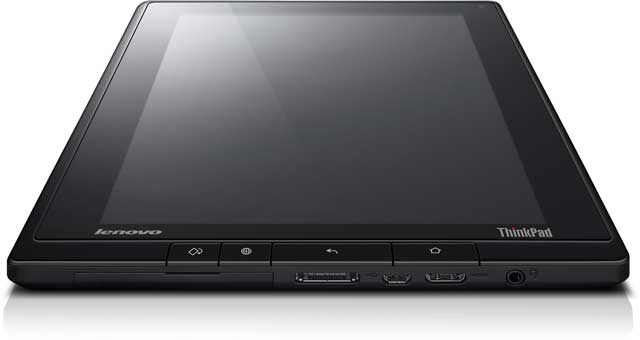
- The Thinkpad Tablet seems indestructible but not chunky. When you hold it, it feels solid but at the same time it is sleek enough not to feel like a clunky, chunky, brick. And by all accounts, it is indestructible or, at least, designed to withstand more than any normal range of destruction.
- It looks good. Business, black, characteristic red spot on the digitiser (stylus) and it feels comfortable in the hand.
- There is a USB port! Amongst other useful connection sockets, the USB port stands out as a very useful addition. While the world is slowly moving to less of the physical connections that come with plugging things in, that wireless world is not quite here yet. In perhaps 5 to 10 years time, when data can be stored and transmitted in huge quantities via the Internet, there will be a sharp drop off in external hard drives and USB storage, but until then, USB is still the common format of choice for physical file transfer.
- The mini HDMI (and other standard ports) are also great. This is even more true for an education setting where it is helpful to be able to connect your device to projection or TV systems to share media with your class. An HDMI to VGA adapter would be necessary in most cases (since schools have VGA cable connections to most projectors) but that is the price of being cutting edge, as the Thinkpad Tablet certainly is. Being able to connect a standard SIM card is also a bonus (for the 3G model) as you can connect on the go, between wireless networks - great for working on the train or bus on your way to the office.
- My colleagues to whom I showed the Thinkpad Tablet felt that no extra case is necessary which is very unlike most tablets. If you take the iPad as en example, the first thing most people do is to buy a case to go with it! The Thinkpad Tablet is certainly secure enough without a case, though for style or convenience a keyboard folio is a good option in my opinion.
- I found the screen width great for viewing complete web pages. While the tablet feels a little narrow, in the landscape position, this is something that I could get used to. As a notebook in the portrait position, I'm not a fan.
- Good battery life seems fine for all day use. I didn't notice any sharp drops in the indicator which seems fairly well calibrated to the actual charge remaining.

Negative
- The buttons on the front face seem unnecessary as they are never used, at least not by me! I found that I only used the volume buttons and the on/off/wake/sleep button.
- For typical use, I don't think this device was made to be used while docked. It is too narrow when vertical and feels a bit odd to view because of this. An extra inch to inch and a half would go down well. That's not really a problem though, because it is designed as a mobile device of course.
- In landscape, the already small height is cut off even further by the menus. This is also something that a regular user is likely to adjust to, but it's nicer to have something feel right straight from the word go.
Bonus
As a recent iPad user, despite my former resistance, I thought it would be interesting to throw in a small comparison with my iPad 2. It's important to note that the Thinkpad Tablet is aiming to accomplish some things which the iPad doesn't, and vice versa.
There is no question that the iPad looks nicer from a cosmetic point of view, with the buttons feeling better and more usable, and it is thinner. However, the Thinkpad Tablet is by far the more reliable bet if you want a tablet to last in a school bag or playground. Also, as soon as you put a case on the iPad - absolutely necessary for most people - then you have lost the good looks. The iPad also fails the connectivity test as there is no way to expand your physical memory or connect to USB peripherals.

That's all for now, next time I'll look at interaction with the device in a bit of detail.
I was hoping to write these as a short series of reviews in the week or so following my demo of the Thinkpad, but busy home life with the new baby is taking more time than I expected. I'm also writing this review in a bit more depth than I planned to. At least the process is thoroughly enjoyable, and hopefully this extended review will be useful for educational facilities considering the mass roll out of tablet devices in their school.

