Thursday, May 24, 2012

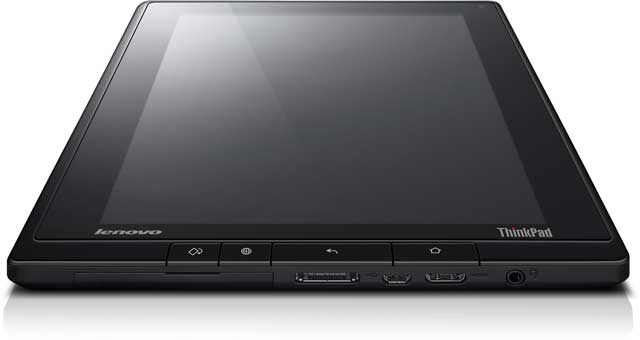
Thinkpad Tablet - The Actual Review (part 1): Physical form and construction

This series of reviews will focus on a single aspect per part.  The final part will sum up what I think.  In this first part the focus is on physical form and construction.

Positive
  • The Thinkpad Tablet seems indestructible but not chunky.  When you hold it, it feels solid but at the same time it is sleek enough not to feel like a clunky, chunky, brick.  And by all accounts, it is indestructible or, at least, designed to withstand more than any normal range of destruction.
  • It looks good.  Business, black, characteristic red spot on the digitiser (stylus) and it feels comfortable in the hand.
  • There is a USB port!  Amongst other useful connection sockets, the USB port stands out as a very useful addition.  While the world is slowly moving to less of the physical connections that come with plugging things in, that wireless world is not quite here yet.  In perhaps 5 to 10 years time, when data can be stored and transmitted in huge quantities via the Internet, there will be a sharp drop off in external hard drives and USB storage, but until then, USB is still the common format of choice for physical file transfer.
  • The mini HDMI (and other standard ports) are also great.  This is even more true for an education setting where it is helpful to be able to connect your device to projection or TV systems to share media with your class.  An HDMI to VGA adapter would be necessary in most cases (since schools have VGA cable connections to most projectors) but that is the price of being cutting edge, as the Thinkpad Tablet certainly is.  Being able to connect a standard SIM card is also a bonus (for the 3G model) as you can connect on the go, between wireless networks - great for working on the train or bus on your way to the office.
  • My colleagues to whom I showed the Thinkpad Tablet felt that no extra case is necessary which is very unlike most tablets.  If you take the iPad as en example, the first thing most people do is to buy a case to go with it!  The Thinkpad Tablet is certainly secure enough without a case, though for style or convenience a keyboard folio is a good option in my opinion.
  • I found the screen width great for viewing complete web pages.  While the tablet feels a little narrow, in the landscape position, this is something that I could get used to.  As a notebook in the portrait position, I'm not a fan.
  • Good battery life seems fine for all day use.  I didn't notice any sharp drops in the indicator which seems fairly well calibrated to the actual charge remaining.
Negative
  • The buttons on the front face seem unnecessary as they are never used, at least not by me!  I found that I only used the volume buttons and the on/off/wake/sleep button.  
  • For typical use, I don't think this device was made to be used while docked.  It is too narrow when vertical and feels a bit odd to view because of this.  An extra inch to inch and a half would go down well.  That's not really a problem though, because it is designed as a mobile device of course.
  • In landscape, the already small height is cut off even further by the menus.  This is also something that a regular user is likely to adjust to, but it's nicer to have something feel right straight from the word go.
Bonus
As a recent iPad user, despite my former resistance, I thought it would be interesting to throw in a small comparison with my iPad 2.  It's important to note that the Thinkpad Tablet is aiming to accomplish some things which the iPad doesn't, and vice versa.  

There is no question that the iPad looks nicer from a cosmetic point of view, with the buttons feeling better and more usable, and it is thinner.  However, the Thinkpad Tablet is by far the more reliable bet if you want a tablet to last in a school bag or playground.  Also, as soon as you put a case on the iPad - absolutely necessary for most people - then you have lost the good looks.  The iPad also fails the connectivity test as there is no way to expand your physical memory or connect to USB peripherals.

That's all for now, next time I'll look at interaction with the device in a bit of detail.

I was hoping to write these as a short series of reviews in the week or so following my demo of the Thinkpad, but busy home life with the new baby is taking more time than I expected.  I'm also writing this review in a bit more depth than I planned to.  At least the process is thoroughly enjoyable, and hopefully this extended review will be useful for educational facilities considering the mass roll out of tablet devices in their school.  

Sunday, April 1, 2012

This is the week! (or not...)

Well, my baby daughter came on time so that's one of the two arriving when expected!

I've been in contact with the suppliers of the demo model Thinkpad Tablet and they've assured me that this is the week when one comes to me. Unfortunately, two of the four weeks for which I have it will be school holidays. This means less education testing and more home testing. I guess that could be an advantage but not for Lenovo so much as me.

Fingers crossed, I get it before Easter!

[update: it didn't arrive...  waning enthusiasm for this little project now.  Instead focusing on my other new little project: parenting a 3 week old daughter :-)  If the Thinkpad Tablet ever turns up I'll do a review]

Tuesday, March 6, 2012

Rugged Tablet Devices, Paintball, Shenanigans, and a Date

Let's start with the date first.  Or more specifically the week.  In about two weeks, coinciding with the arrival of my new daughter, I will have a Lenovo Thinkpad Tablet to trial.  It is arriving in the post which is somewhat different to how new children usually turn up.  The anticipation has come and gone and is now back again.  It went because of a miscommunication that saw me lost in the system for about a month!  Thank goodness I'm proactive enough to get the ball rolling again.  And with my excitement comes a new blog post to keep the hype and excitement building!

As previously covered, the Lenovo range is rugged and durable, with the Thinkpad Tablet included in that.  I have seen many cell phones with broken screens but have never seen a tablet device with one.  Most of the pictures on the Internet are of tablets with apps to show a fake broken screen.  I've never understood that one...

Despite a lack of experience of broken screens, I'm pretty sure it happens from time to time.  I'm pretty sure the cheaper ones are more likely to break in other ways too.  So what would break a tablet?  A few solid impacts?  How about paintball gunfire?  Check out the video below where a couple of professional "crazy men" put the Lenovo Thinkpad Tablet to just these tests:


Crazy!

Tuesday, February 28, 2012

Testing the Lenovo Thinkpad Tablet (video)

Indestructible portable computing devices are what is needed for our schools.  Enter the Lenovo Thinkpad Tablet...

I watched this and thought it was incredible.  My first touch screen phone had a cracked screen after only a month or so.  And that was a Hummer branded phone!

Technology has come a long way since then and there really are products of which we can be confident in their ability to endure hardship!  Check this out:


Sunday, February 26, 2012

Tech doesn't automatically improve outcomes

It is always important to note that technology can be used wisely and it can be used foolishly.  This is why merely throwing money, technology, or anything passive, at a problem doesn't automatically work.

I am hoping to find some great ways to use a Thinkpad Tablet to improve my teaching by considering the problems that I face without such technology.  Any roll out of new tech into schools/education needs to start from the problem before jumping straight to the solution (which might end up creating more of a problem anyway!)

If there was one thing I could do to seriously improve my students' ability to achieve, it would be to give them more time with me in a one on one situation.  I think that the Thinkpad Tablet can help me do this without increasing my time with students in a "real world time" sense.  The chief way I can do this is through making freely available a wide range of videos of my explanations and descriptions from class.  If everything I do in class is available and easy to find, then my students can use this rewindable version of me to have more personal time than I can possibly give for real.

As long as I am recording these explanations and demonstrations in a context that is familiar to them, my students will be able to engage with the videos effectively, i.e. they have to come from things they are learning (and need to learn) so it's no good if they watch a video of an MIT professor talking about the same thing we are learning but at a higher level and using different notation or contexts that are unfamiliar to my students.  Irrelevance is always the danger of any teacher or presenter and this can come in varying degrees.  The closer I can be to delivering exactly what they need, the better the outcome.


Some screen capture software lined up to have a go with:
Screencast Video Recorder Demo - Apps on Android Market http://bit.ly/yHPjqk
Z-ScreenRecorder - Apps on Android Market http://bit.ly/wwTUPl

Tuesday, February 21, 2012

What's the deal?

I've been given the opportunity to trial a Lenovo Thinkpad Tablet through Nick Hall of Lenovo. I offered to do some writing to review the device in exchange for this opportunity.

Three things impressed me about Lenovo over other devices:
  1. There is a clear company philosophy, focus, and direction
  2. The devices are super rugged and durable, backed by a very reasonable warranty
  3. They run the Android operating system
You can read more on this permanent page here.